C# Join function took all the fun out of trivial programming. In the old days creating a comma separated string out of an array of string was a daunting task for junior programmers.
Some would use the postfix technique. Typically they would iterate through an array adding a comma after each string. At the end they would remove the last comma. But only if string was not empty.
Another approach was to add a comma only if string was not the last in the array. This meant abandoning foreach loop to be able to compare index to array size.
There is a much more elegant solution. It might not be useful in C# because the string class already provides this function, but it is a good to know algorithm.
string Join(string separator, string[] array)
{
    StringBuilder sb = new StringBuilder();
    string prefix = null;
    foreach (string s in array)
    {
        sb.Append(prefix);
        sb.Append(s);
        prefix = separator;
    }
    return sb.ToString();
}
Handle it like a pro. :)
string multiline = string.Join(Environment.NewLine
    , "----------------------------------------------"
    , "Bill of Materials"
    , "----------------------------------------------"
    , "Rectangle (10,10) width=30 height=40"
    , "Square (15,30) size=35"
    , "Ellipse (100,150) diameterH = 300 diameterV = 200"
    , "Circle (1,1) size=300"
    , "Textbox (5,5) Text=\"sample text\""
    , "----------------------------------------------");
I had an interview for a project the other day. The challenge was to conjure a vending machine algorithm. Its main computational problem seems to be the coin-purse management. Consider a very simple loop that given a pound sterling amount in pence -all future examples will also use amounts in pence- finds all the combinations of coins to make it up.
void BruteForce(int total)
{
    if (total<=0) return; // Just a sanity check.
    for (int p200 = 0; p200 <= total / 200; p200++)
    { // 200p loop
        int total200 = total - p200 * 200;
        for (int p100 = 0; p100 <= total200 / 100; p100++)
        { // 100p loop
            int total100 = total200 - p100 * 100;
            for (int p50 = 0; p50 <= total100 / 50; p50++)
            { // 50p loop
                int total50 = total100 - p50 * 50;
                for (int p20 = 0; p20 <= total50 / 20; p20++)
                { // 20p loop
                    int total20 = total50 - p20 * 20;
                    for (int p10 = 0; p10 <= total20 / 10; p10++)
                    { // 10p loop
                        int total10 = total20 - p10 * 10;
                        for (int p5 = 0; p5 <= total10 / 5; p5++)
                        { // 5p loop
                            int total5 = total10 - p5 * 5;
                            for (int p2 = 0; p2 <= total5 / 2; p2++)
                            { // 2p loop
                                int total2 = total5 - p2 * 2;
                                for (int p1 = 0; p1 <= total2; p1++)
                                { // 1p loop
                                    int total1 = total2 - p1;
                                    if (
                                        200 * p200
                                        + 100 * p100
                                        + 50 * p50
                                        + 20 * p20
                                        + 10 * p10
                                        + 5 * p5
                                        + 2 * p2
                                        + p1 == total); // Gotcha!
                                }
                            }
                        }
                    }
                }
            }
        }
    }
}
The loop is not optimized. It simply iterates through all possible coin combinations given target amount in p. Nedless to say, the Gotcha! comment in this and all future code samples marks the spot where the solution has been found...but we don't do anything with it.Well, actually, it is slightly optimized. For example if the requested amount is 5p all outer loops (for coins of larger denomination) will only execute once.The following two graphs show the total number of loops executed for totals up to £5 (500p) and the number of solutions found.
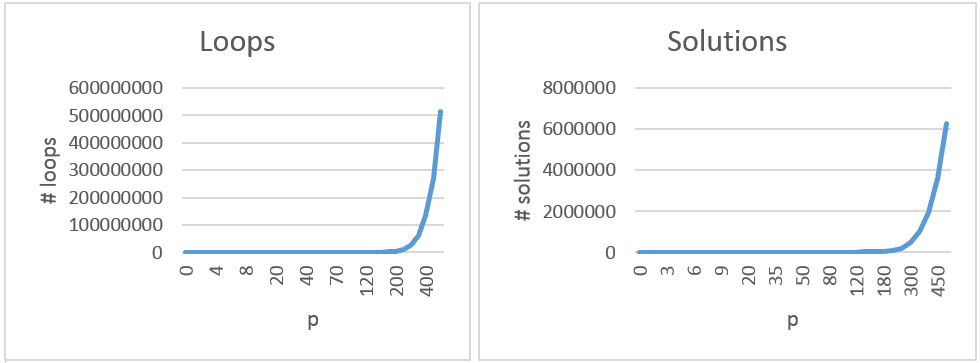
Number of required computations grows exponentionally. And though CPU power is cheap these days, and possibility of vending machine returning more then £5 is minimal - it makes sense to optimize it. Let’s write the same code using recursion.
void RecursiveBruteForce(int coin, int total)
{
    if (coin == 0) return; // Exit criteria.
    else
        for (int qty = total / coin; qty >= 0; qty--)
            if (coin * qty == total); // Gotcha!
            else RecursiveBruteForce(coin==50?20:coin/2, total-coin*qty);
}
That is easier to the eye, but just as greedy. Oh, yes. That coin==50?20:coin/2 is an optimization for finding first smaller coin then current coin from an aging 8-bit assembler programmer ( that would be me :) ). Could be refactored into GetNextCoin(int coin) function to have cleaner, albeit slower code. We transformed loops into a recursive tree search.Now let’s optimize it a bit more by considering the stock of available coins already in the purse. After all we can’t return coins we don’t have. To do this we will assume existence of function int AvailableQty(int coin). No rocket science here:
void RecursiveAvailQty(int coin, int total)
{
    if (coin == 0) return; // Exit criteria.
    else
        for (int qty = Math.Min(AvailableCoins(coin), total / coin); qty >= 0; qty--)
            if (coin * qty == total); // Gotcha!
            else RecursiveAvailQty (coin==50?20:coin/2, total-coin*qty);
}
Since our client does not want tens of coins returned another idea for optimization is to minimize the quantity of coins returned and cut all search tree branches that exceed this.The recursion chooses coins with largest nomination first. This by itself is heuristics and already optimizes the number of coins by directing the search. But there are occasions where this approach does not work. For example: if the vending machine has a supply of 1 x 50p, 3 x 20p, and 10 x 1p and wants to return 60p. By using largest nomination first the first solution will be 1 x 50p, 10 x 1p (11 coins). But wouldn’t you as a client feel much better if the machine returned 3 x 20p (3 coins)?Following code shows algorithm, returning minimal number of coins.
void RecursiveCoinMinimizing(int coin, int total, ref int minqty, int totalqty)
{
    if (coin == 0) return; // Exit criteria.
    else
        for (int qty = Math.Min(AvailableCoins(coin), total / coin); qty >= 0; qty--)
            if (coin * qty == total) minqty=Math.Min(minqty, totalqty + qty); // Gotcha!
            else if (totalqty + qty < minqty)
                RecursiveCoinMinimizing(coin==50?20:coin/2, total-coin*qty, ref minqty, totalqty+qty);
}
To summarize our optimizations:- Our heuristics starts with coins with largest denomination first.
- It cuts all imposible tree branches (that would require quantities of coins we don’t have).
- It then minimizes the quantity coins returned to the client.
- And cuts all tree branches that would contain larger quantity of coins then the solution that we have already found.
Because we start with coins with largest denomination, gradually reducing the quantity of coins with large denomination will increase the total quantity of coins in potential solutions and increase the possibility for the branch to be cut early.
Here is the Coin Minmizing Algorithm at work.

Given unlimited coins in the purse the initial brute force algorithm without any optimization would need to loop 513.269.189 times to find all possible combinations for paying out £5. The Coin Minimizing Algorithm would need to loop only 8.774 times. Even returning £10 can be achieved in real time on an average embedded hardware. If we limit inserting of coins to max. £10 then this solution is considered relatively safe.
So let us call it a day here. :) Sure – there are other optimizations possible. But 1) vending machines are not developed in an evening; these are serious revenue generating softwares and they need serious attention, and 2) this is illustrative enough to shows the approach taken.
Besides speed further optimizations could also include strategies for example defensive behaviour by the vending machine to theoretically minimize the number of failed transactions. This could, perhaps, be done by asset allocation (assigning each denumeration a % of total quantity). And then making rare coins –according to asset allocation- more “expensive” thus directing the search and computing utility value of each generated solution.
Visual Studio automatically creates the AssemblyInfo.cs for every project in the Properties directory. Initially the file looks like this:
using System.Reflection;
using System.Runtime.CompilerServices;
using System.Runtime.InteropServices;

// General Information about an assembly is controlled through the following
// set of attributes. Change these attribute values to modify the information
// associated with an assembly.
[assembly: AssemblyTitle("ASMINFO")]
[assembly: AssemblyDescription("")]
[assembly: AssemblyConfiguration("")]
[assembly: AssemblyCompany("")]
[assembly: AssemblyProduct("ASMINFO")]
[assembly: AssemblyCopyright("Copyright ©  2015")]
[assembly: AssemblyTrademark("")]
[assembly: AssemblyCulture("")]

// Setting ComVisible to false makes the types in this assembly not visible
// to COM components.  If you need to access a type in this assembly from
// COM, set the ComVisible attribute to true on that type.
[assembly: ComVisible(false)]

// The following GUID is for the ID of the typelib if this project is exposed to COM
[assembly: Guid("3b474425-406a-4053-ab89-4cb4aafaf3b1")]

// Version information for an assembly consists of the following four values:
//
//      Major Version
//      Minor Version
//      Build Number
//      Revision
//
// You can specify all the values or you can default the Build and Revision Numbers
// by using the '*' as shown below:
// [assembly: AssemblyVersion("1.0.*")]
[assembly: AssemblyVersion("1.0.0.0")]
[assembly: AssemblyFileVersion("1.0.0.0")]
You commonly shrink it to only include fields that are needed. [assembly: AssemblyTitle("Project title.")]
[assembly: AssemblyDescription("Project description.")]
[assembly: AssemblyCompany("My company.")]
[assembly: AssemblyProduct("Product name.")]
[assembly: AssemblyCopyright("Copyright © 2015 My Company Ltd")]
[assembly: AssemblyTrademark("XYZ™")]
[assembly: AssemblyVersion("1.0.*")]This article is about reading these values from the assembly.To do this let us start a class. I shall call it AssemblyInfo but if you dislike duplicate file names in the project feel free to call it AssemblyInfoReader.
public class AssemblyInfo
{
    private Assembly _assembly;

    public AssemblyInfo(Assembly assembly) { _assembly = assembly; }
}
The class contains a private assembly reference from which we would like to read the values and a constructor. You can pass it the executing assembly, the calling assembly, etc. Think about prefixing the function which obtains the assembly reference with the [MethodImpl(MethodImplOptions.NoInlining)] attribute. Otherwise the body of the function might get inlined and return invalid reference.
Now that we have a class we can write functions to help us read the values. For some attributes this is easy as they are already exposed by existing classes. For example the assembly version /note: this is not the same as assembly file version/ can be read like this:
private Version ReadAssemblyVersion()
{
    if (_assembly != null)
        return _assembly.GetName().Version;
    else
        return null;
}
The version structure will provide you with major version, minor version, build number and revision. Note that when you use "1.0.*" the build number will be equal to the number of days since Jan 1, 2000 local time, and the revision will be equal to the number of seconds since midnight local time, divided by 2. So to annoy the guy /or imaginary guy/ responsible for quality assurance in your company you could actually exploit this to obtain date and time of build.Reading other values requires a bit of reflection. We must first obtain the correct assembly attribute and then read the correct property value. So here is a function to do just that. Provided attribute type as template parameter T and property name as string it returns property value.
private string ReadCustomAttributeValue<T>(string propertyName)
{
    if (_assembly != null) // Just in case.
    {
        object[] customAttributes = _assembly.GetCustomAttributes(typeof(T), false);
        // Don't try to understand this. :)
        if ((customAttributes != null) && (customAttributes.Length > 0))
            return typeof(T).GetProperty(propertyName).GetValue
                (customAttributes[0], null).ToString();
    }
    return string.Empty;
}
To read company name simply create a new property like thispublic string Company { get { return ReadCustomAttributeValue<AssemblyCompanyAttribute>("Company"); } }Here are one liners to read all values as properties.public string Company { get { return ReadCustomAttributeValue<AssemblyCompanyAttribute>("Company"); } }
public string Version { get { return ReadAssemblyVersion() != null ? string.Format("{0}.{1}",ReadAssemblyVersion().Major,ReadAssemblyVersion().Minor) : string.Empty; } }
public string Build { get { return ReadAssemblyVersion() != null ? ReadAssemblyVersion().Build.ToString() : string.Empty; } }
public string Revision { get { return ReadAssemblyVersion() != null ? ReadAssemblyVersion().Revision.ToString() : string.Empty; } }
public string Product { get { return ReadCustomAttributeValue<AssemblyProductAttribute>("Product"); } }
public string Copyright { get { return ReadCustomAttributeValue<AssemblyCopyrightAttribute>("Copyright"); } }
public string Title { get { return ReadCustomAttributeValue<AssemblyTitleAttribute>("Title"); } }
public string Description { get { return ReadCustomAttributeValue<AssemblyDescriptionAttribute>("Description"); } }
public string Trademark { get { return ReadCustomAttributeValue<AssemblyTrademarkAttribute>("Trademark"); } }We're almost done. Let us store some custom values to the assembly. For example: assembly service contact /an email/. The elegant way to do this is to create our own attribute.[AttributeUsage(AttributeTargets.Assembly)]
public class AssemblyContactAttribute : Attribute
{
private string _contact;
public AssemblyContactAttribute() : this(string.Empty) {}
public AssemblyContactAttribute(string contact) { _contact = contact; }
public string Contact { get { return _contact; } }
}Then include it into our AssemblyInfo.cs file.[assembly: AssemblyTitle("Project title.")]
[assembly: AssemblyDescription("Project description.")]
[assembly: AssemblyCompany("My company.")]
[assembly: AssemblyProduct("Product name.")]
[assembly: AssemblyCopyright("Copyright © 2015 My Company Ltd")]
[assembly: AssemblyTrademark("XYZ™")]
[assembly: AssemblyVersion("1.0.*")]
[assembly: AssemblyContact("support@my-company.com")]
And finally; extend our class with a new property to read this value.
public string Contact { get { return ReadCustomAttributeValue<AssemblyContactAttribute>("Contact"); } }There. Now we're done.
The issue is to size the picture to fit into given window without distorting it. I found many über complicated solutions on the internet so I ended up writing my own. Here's the algorithm in prose:
Find the factor by which you need to multiply your picture's width and height. Try using outer height / inner height and if the width doesn't fit, use outer width / inner width.Here's the code fragment.
private float ScaleFactor(Rectangle outer, Rectangle inner)
{
    float factor = (float)outer.Height / (float)inner.Height;
    if ((float)inner.Width * factor > outer.Width) // Switch!
        factor = (float)outer.Width / (float)inner.Width;
    return factor;
}
To fit picture rectangle (pctRect) to window rectangle (wndRect) call it like thisfloat factor=ScaleFactor(wndRect, pctRect); // Outer, inner RectangleF resultRect=new RectangleF(0,0,pctRect.Width*factor,pctRect.Height*Factor)
If you trap an exception inside your control and don't know how to handle it - turn it into an event.
public event EventHandler<ExceptionEventArgs> Exception;Raise the event inside the catch block.
Introduction
Object oriented programming is an ancient art. When you hear about inversion of control or dependency injection, you should know that these are new names for concepts that have been around for a long time. Today we are going to explore one such ancient technique: a pattern for populating a tree control using the inversion of control; from the early days of computing when resources were sparse.
Let us create a Windows Forms derive Tree View to visualise a hierarchy in an elegant manner. When I say elegant I mean:
- minimal memory signature,
- making control reusable,
- lazy loading data as the user drills down the tree, and
- allow various data objects to be attached to tree nodes.
There is really only one trick behind it: populate top level nodes and check if they have any children. If they do - insert a dummy node under them so that + appears left of the tree node. This will enable tree node expansion. Detect it and populate sub-tree using exactly the same technique.
In 2002 I have published an article on modelling hierarchies using SQL based DBMS. If the data that you visualise uses such storage there are some good tricks there to consider.
The Tree Node
First we need to define a tree node data structure. This is basic building block of our tree structure. It is independent of presentation method. You will be surprised to see that the class has no reference to its parent or its children. Because we are using lazy loading these references are resolved when needed. The code for resolving them is separated to the hierarchy feed class.
public class Node
{
    public Node(string unique, string name, bool hasChildren)
    { Unique = unique; Name = name; HasChildren = hasChildren; }

    public string Unique { get; set; }
    public string Name { get; set; }
    public bool HasChildren { get; set; }
}
The three fields are:
Unique This is the identifier (or the key) of this particular node.
Name This is human readable name for the node.
HasChildren True if node has children and can be expanded.
The Feed
We want the user to be able to use our control for visualizing any hierarchy with minimal effort. Here is a minimalistic tree feed interface. All you really need to implement is a function to query children of a node (or root nodes if parent is not given).
public interface IHierarchyFeed
{
    List<Node> QueryChildren(Node parent);
}
For better understanding of how this feed works let us observe an implementation of this interface for enumerating files and folders in the file system.
public class FileSysHierarchyFeed : IHierarchyFeed
{
    private string _rootPath;
    private string _filter;

    public FileSysHierarchyFeed(string rootPath, string filter)
    {
        _rootPath = rootPath;
        _filter = filter;
    }

    public List<Node> QueryChildren(Node parent)
    {
        List<Node> children = new List<Node>();
        if (parent == null)
            AddFilesAndFolders(_rootPath, children);
        else
            AddFilesAndFolders(parent.Unique, children);
        return children;
    }

    #pragma warning disable 168 // Ex variable is never used.
    private void AddFilesAndFolders(string path, List children) {
        foreach (string fso in Directory.EnumerateDirectories(path,"*.*",SearchOption.TopDirectoryOnly)) {
            string unique=Path.Combine(path,fso);
            try { children.Add(new Node(unique, Path.GetFileName(fso), Directory.EnumerateFileSystemEntries(unique).Count() > 0)); }
            catch (UnauthorizedAccessException ex) { } // Ignore unauthorized access violations.
        }
        foreach(string file in Directory.EnumerateFiles(path,_filter)) children.Add(new Node(Path.Combine(path,file),Path.GetFileName(file),false));
    }
}
Simple, isn’t it? You initialize the feed object with root path and filter, for example c:\ and *.*. When you call QueryChildren with null parameter it returns files and folders from the root path. It uses entire path as the node unique. When calling QueryChildren on a particular node it extracts path from the unique and uses it to enumerate files and folders under this folder.
You can easily write feeder class for database items, remote items, etc.
The TreeView Control
Last but not least - here is the tree view derived control.
public class NavigatorTree : TreeView
{
    private class ExpandableNode
    {
        private Node _node;
        private IHierarchyFeed _feed;
        public ExpandableNode(Node node, IHierarchyFeed feed) { _node = node; _feed = feed; }
        public void Expand(TreeNode treeNode) {
            treeNode.TreeView.BeginUpdate();
            treeNode.Nodes.RemoveAt(0); // Remove expandable node.
            foreach (Node childNode in _feed.QueryChildren(_node))
            {
                // Add company.
                TreeNode childTreeNode = treeNode.Nodes.Add(childNode.Name);
                childTreeNode.Tag = childNode;

                // Check if there are any children.
                if (childNode.HasChildren)
                {
                    TreeNode toExpandNode = childTreeNode.Nodes.Add("");
                    toExpandNode.Tag = new ExpandableNode(childNode, _feed);
                }
            }
            treeNode.TreeView.EndUpdate();
        }
    }

    private IHierarchyFeed _feed;

    public void SetFeed(IHierarchyFeed feed)
    {
        _feed = feed;
        Populate();
    }

    private void Populate()
    {
        Nodes.Clear();

        BeginUpdate();
        foreach (Node node in _feed.QueryChildren(null))
        {
            // Add company.
            TreeNode treeNode = Nodes.Add(node.Name);
            treeNode.Tag = node;

            // Check if there are any children.
            if (node.HasChildren)
            {
                TreeNode toExpandNode = treeNode.Nodes.Add("");
                toExpandNode.Tag = new ExpandableNode(node, _feed);
            }
        }
        EndUpdate();
    }

    protected override void OnBeforeExpand(TreeViewCancelEventArgs e)
    {
        // Check if node has only one child and that child is expandable.
        if (e.Node.Nodes.Count == 1)
        {
            ExpandableNode expandable = e.Node.Nodes[0].Tag as ExpandableNode;
            if (expandable != null)
                expandable.Expand(e.Node);
        }
    }
}
Voila. It doesn’t get any simpler that that. You initialize tree control by calling SetFeed and providing feed class. For example:
navigatorTree.SetFeed(new FileSysHierarchyFeed("c:\\", "*.*"));
The control then calls Populate() which in turn populates first tree level and links every tree node with corresponding Node object via the Tag field. If a node has children the populate function adds a fake node of type ExpandableNode under it.
In OnBeforeExpand function the control checks for ExpandableNode. If it founds it - it calls it’s expand function to populate next tree level … and removes the fake node.
This is an advanced sequel to C#: Enums and Strings Are Friends. One of particularly interesting features of an enum is the possibility of extending its values with attributes.
public enum Digits
    {
        [Arabic("1")]
        [Roman("I")]
        One=1,
        [Arabic("2")]
        [Roman("II")]
        Two,
        [Arabic("3")]
        [Roman("III")]
        Three
    }
These values can be obtained using .NET reflection mechanism. .NET already defines a lot of useful attributes such as Description, DisplayName, DefaultValue.On top of that you are able to derive your custom attributes from the Attribute class. By adding properties to this class you can attach a plethora of information to each value of an enum.
[AttributeUsage(AttributeTargets.Field)]
public class RomanAttribute : Attribute
{
    private readonly string _digit;

    public string Digit
    {
        get { return _digit; }
    }

    public RomanAttribute(string title)  // url is a positional parameter
    {
        _digit = title;
    }
}
Wouldn't it be nice if we could read value of any property of any attribute straight off enum value? The problem with this concept is ... properties of different attributes have different names. For example: DescriptionAttribute has property named Description, and DisplayNameAttribute has property named DisplayName.Luckily we live in the age of generics and reflections. So reading these properties no longer requires hard coded attribute type and target property. You can simply pass attribute type, property type, property name and enum to a function and let reflection do its business.
// Read [Description] attribute.
Enum e = Days.Sat;
string s = e.GetAttributeProperty<DescriptionAttribute, string>("Description");
Console.WriteLine("Description is {0}", s);
// Read [DisplayName ] attribute.
s = e.GetAttributeProperty<DisplayNameAttribute, string>("DisplayName");
Console.WriteLine("Display name is {0}", s);
// Find enum value based on [Description].
Enum ef = e.FindEnumValueByAttributeProperty<DescriptionAttribute, string>("Description","Friday");
All that is left is to write these two conversion functions.
public static class EnumEx
{
    #region Enum Extensions
    public static PT GetAttributeProperty<AT, PT>(this Enum this_, string propertyName)
        where AT : Attribute
        where PT : class
    {
        // First get all attributes of type A.
        AT[] attributes =
            (this_.GetType().GetField(this_.ToString())).GetCustomAttributes(typeof(AT), false) as AT[];

        if (attributes == null || attributes.Length == 0) // Null or can't cast?
            return null;
        else
        { // We have something.
            AT a = attributes[0];
            PropertyInfo pi = a.GetType().GetProperty(propertyName);
            if (pi != null)
            {
                PT result = pi.GetValue(a, null) as PT;
                return result;
            }
            else
                return null;
        }
    }

    public static Enum FindEnumValueByAttributeProperty<AT, PT>(this Enum this_, string propertyName, PT propertyValue)
        where AT : Attribute
        where PT : class, IComparable
    {
        // First get all enum values.
        Array enums = Enum.GetValues(this_.GetType());
        foreach (Enum e in enums)
        {
            PT p = e.GetAttributeProperty<AT, PT>(propertyName);

            if (p!=null && p.Equals(propertyValue))
                return e;
        }
        return null;
    }
    #endregion // Enum Extensions
}
UPDATE: It seems like the usage of < and > symbols in code corrupted the listings. Fixed it.
If you need a portable .NET solution for converting RGB to HLS and vice versa there are libraries around to do it. For Windows only using the Shell Lightweight Utility Functions is a simpler alternative.
[DllImport("shlwapi.dll")]
static extern int ColorHLSToRGB(int H, int L, int S);
[DllImport("shlwapi.dll")]
static extern void ColorRGBToHLS(int RGB, ref int H, ref int L, ref int S);
// RGB2HLS
ColorRGBToHLS(ColorTranslator.ToWin32(rgbColor, ref h, ref l, ref s);
// HLS2RGB
Color rgbColor=ColorTranslator.FromWin32(ColorHLSToRGB(h, l, s));
Sometimes you want a function to return an object or null if no object is found. Lazy evaluation makes it easy to automate this behaviour.
public Person FindPerson(Criteria c)
{
    Lazy<Person> person = new Lazy<Person>();
    // Code to actually find a person ...
    // ... and populate person.Value
    return person.IsValueCreated ? person.Value : null;
}
This is fairly ellegant. If no person is found lazy evaluation assures that the object is never created and related resources are not spent. Be careful though! Here's a common pest.foreach (Font font in GetFixedFonts())
{
// But GetFixedFonts returned null.
}The fictional GetFixedFonts() function called in code bellow returns Font[] collection. You assume it will always return a non- null value. But then on a bad day it doesn't and your code breaks with an exception.You can assure that function always returns an array /even if empty/ by using lazy evaluation too. Here is an example of that.
public FontFamily[] GetFixedFonts()
{
    Lazy<List<FontFamily>> fonts = new Lazy<List<FontFamily>>();

    foreach (FontFamily ff in System.Drawing.FontFamily.Families)
        if (IsFixedFontFamily(ff))
            fonts.Value.Add(ff);

    return fonts.Value.ToArray();
}
You know the drill. Programming a graph takes too much time...use a library...or hire an external consultant. But...is it really so?
Imagine you have two coordinate systems. Your physical screen coordinate system spans from 0 to window's width horizontally and from 0 to window's height vertically. And your imaginary world (i.e. a map) spans from -10.000 to 10.000 horizontally and from 0 to 5000 vertically.
Just to make things a bit more complex you also want to:
- zoom everything on the screen by arbitrary zoom factor, and
- show only part of your map on the screen starting from point T(-3.000, 1000) given in map coordinates, where -3000 is left and 1000 is top coordinate of part of map we would like to display on screen.
Map to Screen
Are you scared yet? Don’t be. Here is the basic formula for converting map coordinate to screen coordinate:

Same formula can be applied to another dimension. For example:

So far ... so trivial. :) Since you start at point T(x,y) you need to put x and y to point to 0,0 on the screen. Afterwards you simply multiply by zoom factor. If factor is 1 then 1 point on the map is converted to 1 point on the screen. If the factor is 1:2 then 1 point on the map is only ½ point on the screen. And so on.
If the axis is a reverse axis then your equation is:

Screen to Map
What if somebody clicks on the screen and we need to find map coordinate of the click? Let us derive this scenario from the above equation:

Deriving same formula for the reverse axis is a good exercise for you, don’t you agree? :)
Fit to Screen
If we want to fit our map inside the screen we must start drawing it at its T=T0 point. We calculate T by using:

No big secrets here. So our left, right point T is at map's min x and min y. And if reverse axis is being used we must use max instead.
The apropriate fit to screen zoom is calculated like this:

If you are using same unit for both axes then there will be only one zoom factor. To still fit map to the screen make sure that you fit larger dimension of both - width or height to fit the screen. Then use the same zoom factor for smaller dimension. This way both are guaranteed to fit the screen.
Calculate Distances
Last but not least ... distances are calculated with a little help from previous calculations. If you have a distance in screen units and you would like to convert to map distance you subtract it from point zero and derive the formula like this:

The distance obviously depends on the zoom factor alone. For better understanding derive the opposite formula and get screen distance from map distance yourself. :)
Coming Next...
So there you have it. Most of these formulas are -in fact- just simplified 4 x 4 matrix translation, usually performed for you by modern 2D graphics engines such as GDI+ or Cairo.
Observing simplicity of graph math one realizes that graphs aren't really such a terrible development effort. It's drawing points, lines and polygons using these formulas to translate coordinates. Zooming is changing the zoom factor, and scrolling is changing the T point. We will take a closer look at these operations in part two of this series.
A singleton is like the Egg of Columbus. Easy after someone had showed you how to do it. Luckily Jon Skeet had showed us how to use lazy evaluation for thread safety. And an unknown contributor of Great Maps had demonstrated the usage of generics for that purpose. So all that is left for me - is to put it all together.
public sealed class Singleton<T> where T : new()
{
    private static readonly Lazy<T> instance = new Lazy<T>(() => new T());

    public static T Instance { get { return instance.Value; } }

    private Singleton()
    {
    }
}

// Create two server objects pointing to the same instance.
Server svr1 = Singleton<Server>.Instance;
Server svr2 = Singleton<Server>.Instance;
Reference:- C# In Depth: Implementing the Singleton Pattern in C#
- GMap.NET Singleton Class
So you needed to draw a grid … or a ruler … or another x-y-ish vector graphics and you ended up with code snippets like this everywhere:
public void Grid(Graphics g, Size size, int step) {
    for (int i = 0; i < size.Width; i+=step)
    {
        g.DrawLine(Pens.Black,
            new Point(i, 0),
            new Point(i, size.Height)
        );
    }
    for (int i = 0; i < _size.Height; i += step)
    {
        g.DrawLine(Pens.Black,
            new Point(0, i),
            new Point(size.Width, i)
        );
    }
}
You can avoid redundancy in such situations by using the strategy pattern. First create a new interface called IDirection.
public interface IDirection
{
    int GetMoving(Size size);
    int GetStatic(Size size);
    void AddMoving(ref int x, ref int y, int step);
    Point GetPoint(int moving, int static_);
}
Now imagine yourself free- falling into a deep hole. Remember, you are a programmer. So stop screaming and start thinking about the fall. Your moving direction is vertical. And since you are in a vertical free- fall you almost don’t move in x direction. Therefore your static direction is horizontal. Now write this in code.
public class VerticalDirection : IDirection
{
    public int GetMoving(Size size)
    {
        return size.Height;
    }

    public void AddMoving(ref int x, ref int y, int step)
    {
        y += step;
    }

    public Point GetPoint(int moving, int fixed_)
    {
        return new Point(fixed_, moving);
    }

    public int GetStatic(Size size)
    {
        return size.Width;
    }
}
And a HorizontalDirection class.
class HorizontalDirection : IDirection
{
    public int GetMoving(System.Drawing.Size size)
    {
        return size.Width;
    }

    public void AddMoving(ref int x, ref int y, int step)
    {
        x += step;
    }


    public Point GetPoint(int moving, int fixed_)
    {
        return new Point(moving, fixed_);
    }

    public int GetStatic(Size size)
    {
        return size.Height;
    }
}
There we go. Static and moving direction for each concrete direction class are encapsulated and we can now write new grid drawing code.
public void Grid(Graphics g, Size size, int step)
{
    Grid(g, size, step, new VerticalDirection());
    Grid(g, size, step, new HorizontalDirection());
}

public void Grid(Graphics g, Size size, int step, IDirection direction)
{
    for (int i = 0; i < direction.GetMoving(size); i += step)
    {
        g.DrawLine(Pens.Black,
            direction.GetPoint(i, 0),
            direction.GetPoint(i, direction.GetStatic(size))
        );
    }
}
How many times have you stumbled over mess like this?
enum Days { Sat = 1, Sun, Mon, Tue, Wed, Thu, Fri };
private string DayToString(Days day)
{
string str;
switch (day) {
case Days.Mon:
str = "Mon";
break;
case Days.Tue:
str = "Tue";
break;
case Days.Wed:
str = "Wed";
break;
case Days.Thu:
str = "Thu";
break;
case Days.Fri:
str = "Fri";
break;
case Days.Sat:
str = "Sat";
break;
case Days.Sun:
str = "Sun";
break;
default:
str = "Messday";
break;
}
return str;
}
In C++ there was no easy way to cast enumerations to strings and vice versa thus many old dogs keep on using old tricks to do it. However in C# there are several easier ways to achieve the same result. First there is the obvious
Days day = Days.Mon;
dayAsString = day.ToString();
...and it actually works. Then there is a way to retreive string name by index using Enum.GetName function like this...
firstDayOfWeek = Enum.GetName(typeof(Days), 1);
dayAsString = Enum.GetName(typeof(Days),Days.Tue);
There also exists an easy way to cast string back to original enum value by using the Parse function.
Days today = (Days)Enum.Parse(typeof(Days), dayAsString);
Last but not least - for those of you who demand real sophistication - here are casts in both directions via descriptive attributes. The code is somehow sloppy since my objective is to show you how to do it - not do it for you. :)
using System;
using System.Collections.Generic;
using System.Text;
using System.Reflection;
using System.ComponentModel;
public class Warrior
{
private class DescAttrFinder {
private string descAttributeValue;
public DescAttrFinder(string descAttributeValue)
{
this.descAttributeValue = descAttributeValue;
}
public bool FindPredicate(FieldInfo fi)
{
DescriptionAttribute[] descAttributes = fi.GetCustomAttributes(typeof(DescriptionAttribute), false) as DescriptionAttribute[];
string desc = (descAttributes.Length > 0) ? descAttributes[0].Description : null;
return descAttributeValue.CompareTo(desc) == 0;
}
}
public enum Rank
{
[Description("Private")]
Private = 1,
[Description("Private First Class")]
PrivateFirstClass,
[Description("Specialist")]
Specialist,
[Description("Corporal")]
Corporal,
[Description("Seargant")]
Seargant,
[Description("Staff Sergeant")]
StaffSergeant
}
public string GetRankDescription(Rank rank) {
Type type = typeof(Rank);
FieldInfo fieldInfo = type.GetField(rank.ToString());
DescriptionAttribute[] descAttributes = fieldInfo.GetCustomAttributes(typeof(DescriptionAttribute), false) as DescriptionAttribute[];
return (descAttributes.Length > 0) ? descAttributes[0].Description : null;
}
public Rank GetRankFromDescription(string rank)
{
Type type = typeof(Rank);
List <FieldInfo> fields= new List<FieldInfo>(type.GetFields());
DescAttrFinder finder=new DescAttrFinder(rank);
FieldInfo fi=fields.Find(finder.FindPredicate);
return (Rank)fi.GetRawConstantValue();
}
}
It is a matter of taste and as old Roman wisdom teaches de gustibus non est dispudandum. I use this.
1 /*
2 * $Workfile: $
3 *
4 * This file contains implementation of xxxxxxxx class.
5 *
6 * Note:
7 *
8 * (C) Copyright 2007 My Company Ltd.
9 * All rights reserved.
10 *
11 * $Revision: $
12 *
13 * $Log: $
14 *
15 */
It includes source control tags which are standard and supported by most source control systems.
If you plan to use this you should really include it into your Visual Studio new file template so that you don't have to copy'n'paste it every time you create a new class.